
QuickBooks doesn’t know what a VIN is. Kountr does.
Kountr is the accounting layer built for Canadian used-car dealers. Track cost and gross on every VIN, watch your cash on the lot age in real time, and file HST without a spreadsheet. It sits alongside your DMS, it doesn't replace it.
You shake hands on a deal and it feels like a winner. Whether it actually was — after recon, transport, and F&I land — you don't really know until the books are reconciled weeks later. By then the unit's gone.
Detail, tires, a safety, some body work. Half of it ends up in a general expense bucket instead of attached to the VIN that incurred it. Your true cost basis per unit is a guess.
Generic accounting has no concept of a unit, days on lot, or a dealer chart of accounts. So you bolt spreadsheets onto the side and hope the two agree at year-end.
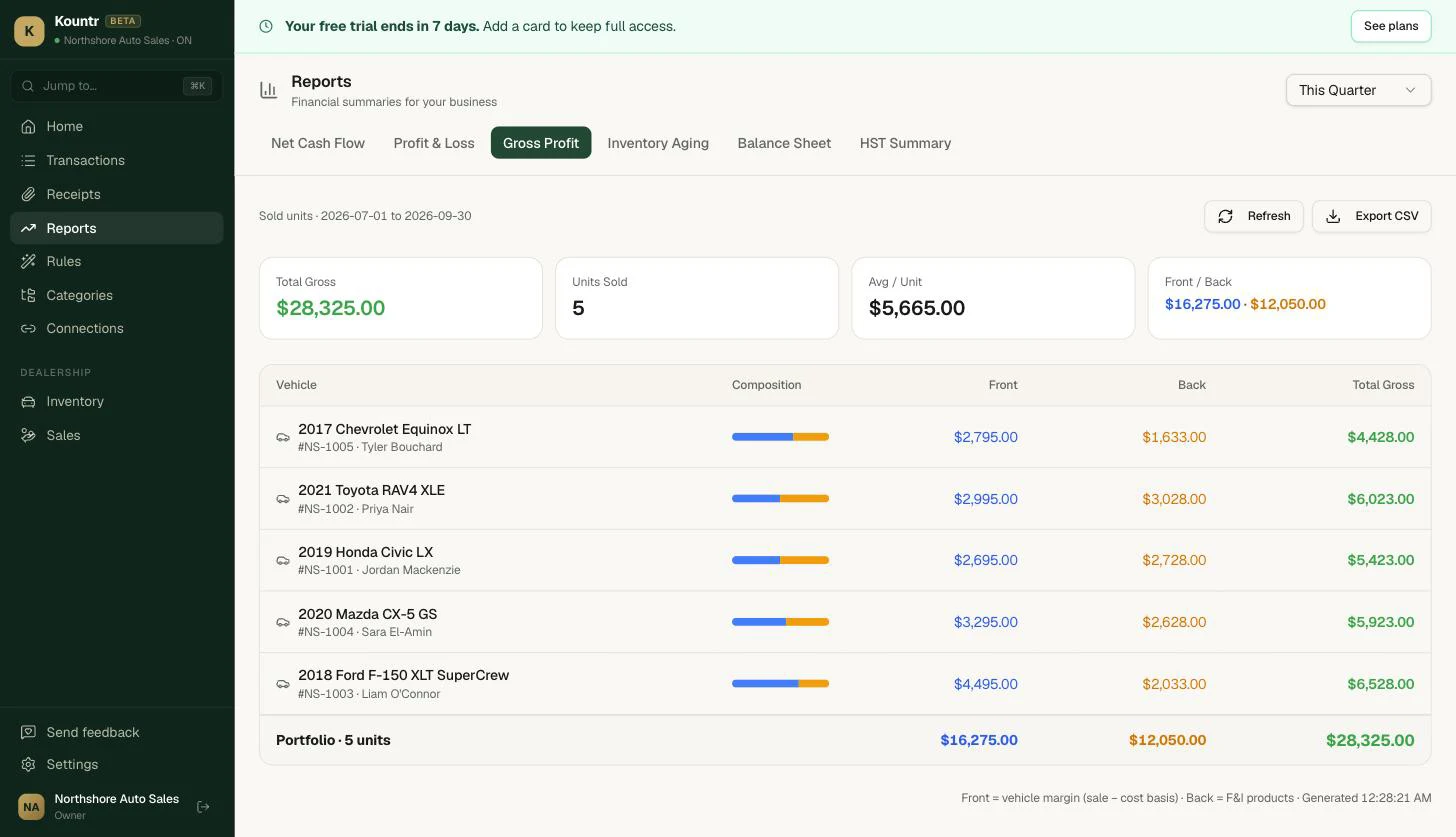
See front and back gross on every unit.
Every recon dollar and transport fee attaches to the VIN, so cost basis is real, not rounded. Sale price minus cost is your front gross; F&I products are your back gross. Both show the moment the deal closes.
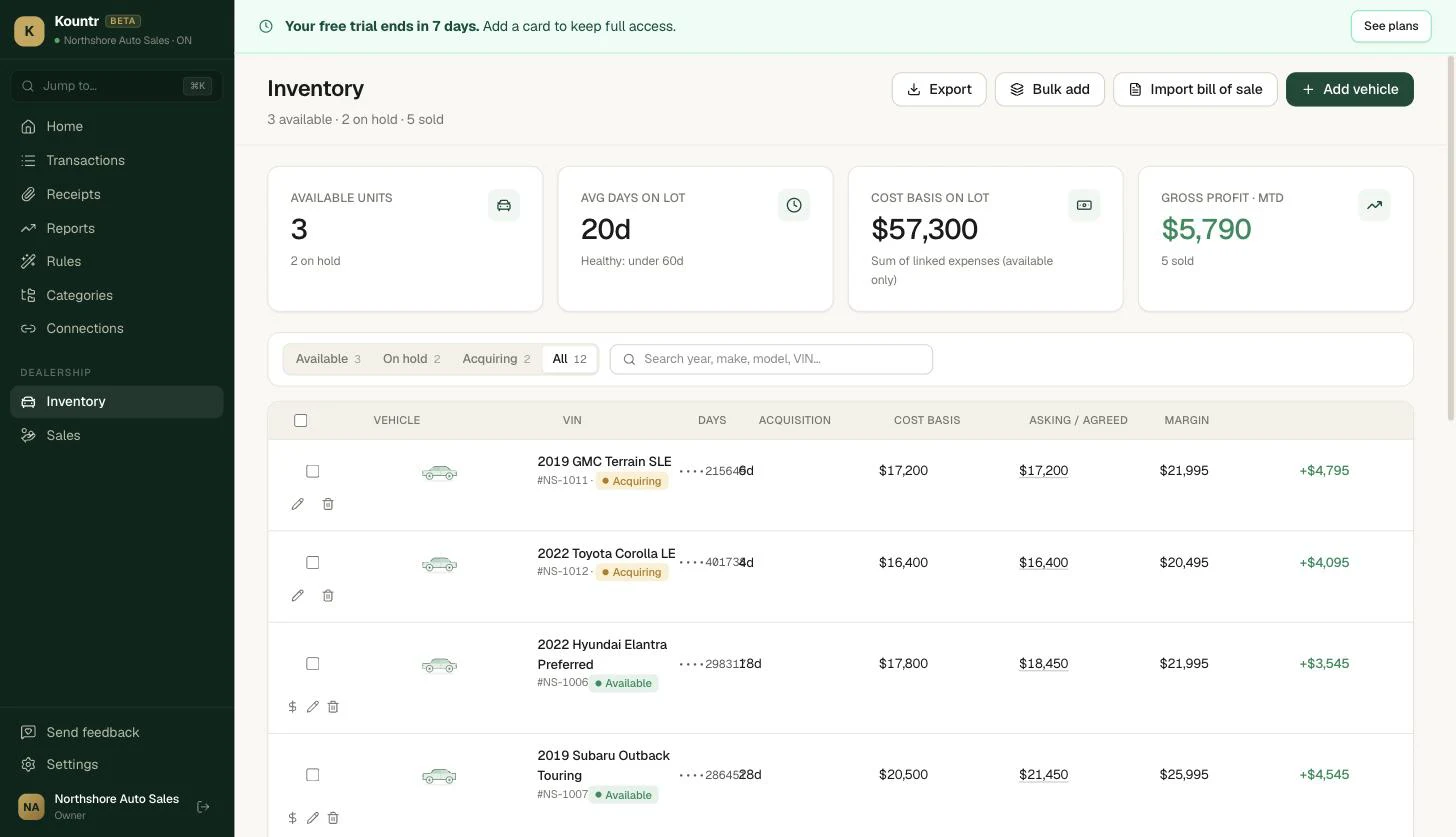
Every VIN, tracked from acquisition to sold.
Status, days on lot, cost basis, and margin — per vehicle, updated the moment a deal closes. No spreadsheet reconciliation at month-end.
Accounting that speaks used-car.
VIN-level cost basis
Purchase price, recon, transport, and fees all attach to the unit. Kountr tracks inventory cost and how it ages — floor-plan-aware — so you always know what a car actually owes you.
Front and back gross per unit
Front gross is sale price minus true cost basis. Back gross is your F&I products. See both on every unit and roll them up across the lot, without waiting for month-end.
Inventory aging and cash on lot
Total cash tied up in stock, split into 0–30, 31–60, 61–90, and 90+ day buckets. The units quietly eating your carrying cost stop hiding.
Dealer chart of accounts, out of the box
Vehicle Sales, Trade-in Revenue, F&I Products, Service & Parts, MTO Expense — the accounts a dealer actually uses, ready on day one. Most accounting software hands you a generic list and a blank stare.
Plaid bank sync and a live HST report
Connect your accounts through Plaid (RBC and Amex confirmed, big Canadian banks covered) and watch transactions land. A live HST report shows HST collected, ITCs, net owing, and per-province rates, with CSV export.
CPA Mode for your accountant
Full double-entry underneath: journal entries, trial balance, and period locking. Your accountant gets real books to work from instead of a shoebox and a prayer.
From lot to filed, in one place.
Load units, attach costs
Bring in your inventory and attach every recon dollar, transport fee, and cost to the VIN it belongs to.
Start a deal
From any unit, capture the customer's name, email, phone, and agreed sale price. The deal is now a live record.
See your gross
Front and back gross the moment the deal closes, plus cash on lot and aging updating as inventory moves.
File HST
Live HST report with collected, ITCs, and net owing. Export figures you can use for OMVIC reporting, or hand your CPA the books directly.
Kountr keeps one set of books today. Separate multi-rooftop reporting isn't a feature yet, and live CRM and DMS integrations are coming soon rather than shipping now. We'd rather tell you that up front.
Where dealer accounting differs from general ledgers.
| Feature | Kountr | QuickBooks Online | FreshBooks | Sage |
|---|---|---|---|---|
| Built in Canada | ✓ | — | ✓ | — |
| Per-unit front + back gross | ✓ | manual classes | — | manual |
| Dealer chart of accounts built in | ✓ | — | — | — |
| Inventory aging by days on lot | ✓ | generic stock | — | generic stock |
| Live Canadian HST report | ✓ | ✓ | partial | ✓ |
| Designed to sit alongside a DMS | ✓ | — | — | — |
Not a dealer? See Kountr's bookkeeping software for freelancers →
Asked and answered.
Does Kountr replace my DMS?+
No. Kountr is accounting software built for dealers — we sit alongside your DMS, not on top of it. You keep running your lot the way you do today and Kountr handles the books, the per-unit gross, and the HST. Direct CRM and DMS connectors are on the way; today you bring deal and cost data in and Kountr takes it from there.
How does per-unit profit tracking actually work?+
Every cost attaches to the VIN — acquisition price, recon, transport, anything you log against the unit builds its cost basis. When the vehicle sells, the Gross Profit report shows front gross (sale price minus cost basis) and back gross (F&I products) for that unit, so you know what you actually made before the keys change hands.
Does Kountr track floor plan?+
Kountr tracks the accounting side of your lot: per-unit cost basis and an Inventory Aging report showing cash on the lot and how long each unit has been sitting (0–30, 31–60, 61–90, 90+ days). It is floor-plan-aware for cost and aging — it is not a floor-plan financing system and does not amortize lender interest for you.
What makes the accounting dealer-specific?+
The chart of accounts ships tuned for a dealership out of the box — Vehicle Sales, Trade-in Revenue, F&I Products, Service & Parts, MTO Expense, and more — instead of a generic small-business template you'd have to rebuild. Bank feeds come in via Plaid and categorize against those accounts automatically.
Can I start a deal from Kountr?+
Yes. From any unit in Inventory you can start a deal — capture the customer's name, email, phone, and agreed sale price — which ties the sale back to that VIN's cost basis for a clean per-unit gross. It's lightweight deal capture, not a full desking or F&I menu tool.
Can my accountant work in here, and can it export to QuickBooks?+
Yes to both. Flip on CPA Mode for full double-entry — journal entries, trial balance, and period locking — and invite your accountant in. Every report exports to CSV, so if your accountant lives in QuickBooks you can hand them clean data at year-end.
Does it handle OMVIC and Canadian tax?+
Kountr calculates HST/GST/PST by province and produces a Canadian HST report with your net owing (or refund) that you file through CRA My Business Account — we don't auto-file. It gives you the numbers you need for your books and reporting; you stay in control of anything you submit to a regulator.
Is my data Canadian-hosted?+
Yes. All Service data sits in AWS Canada (Central) — see our Security page for the full posture.